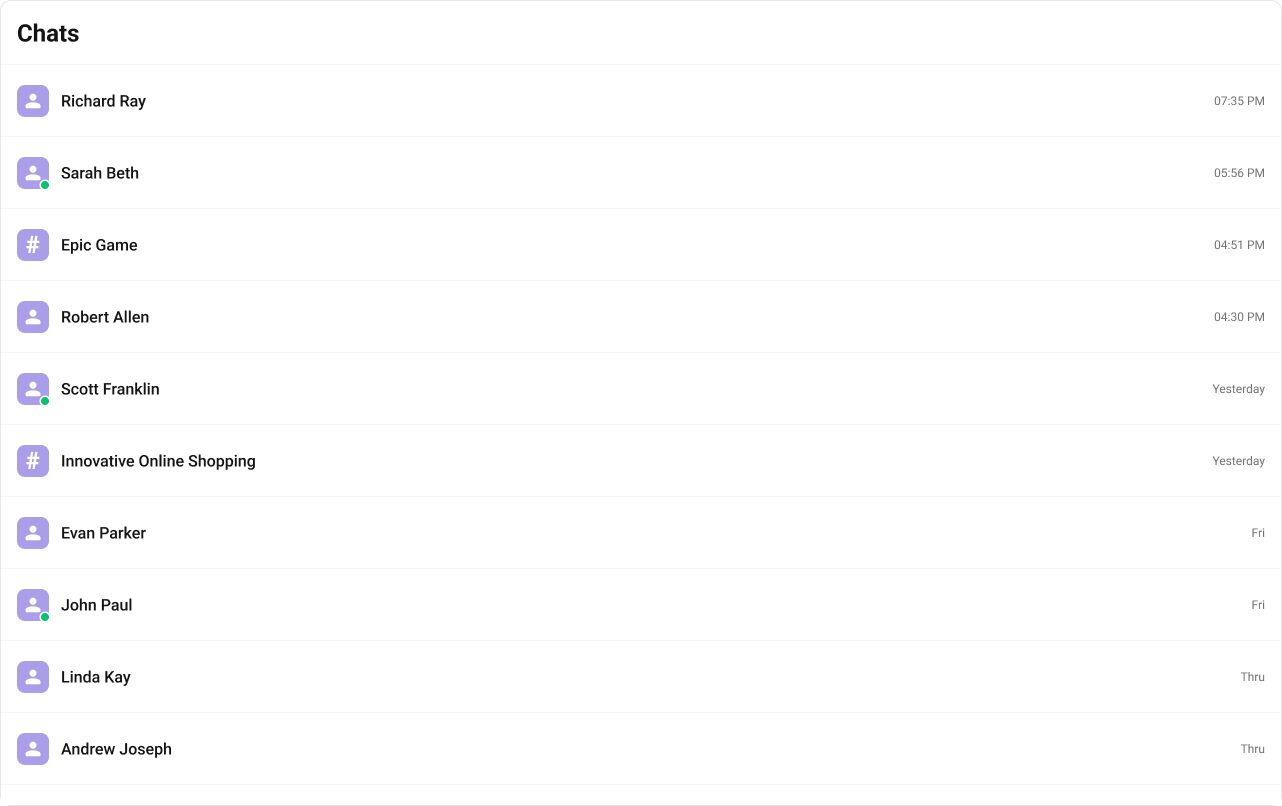
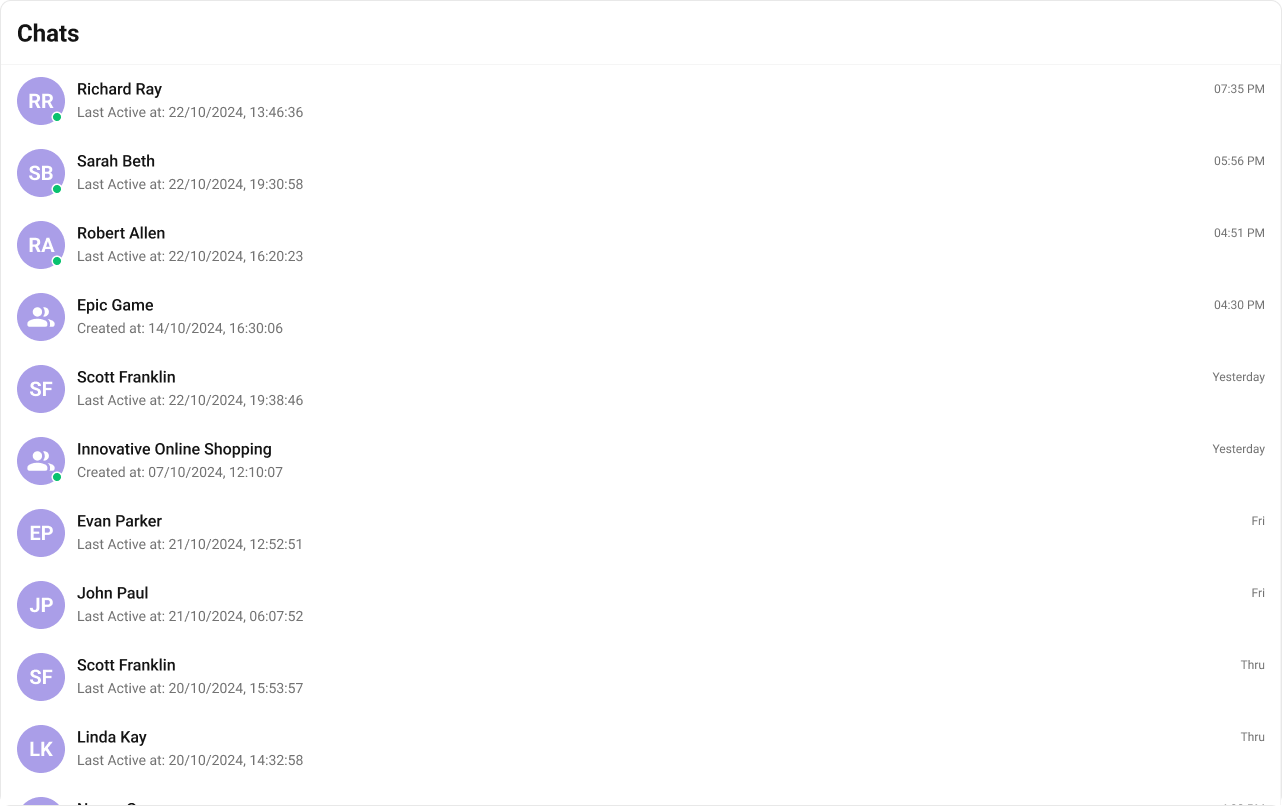
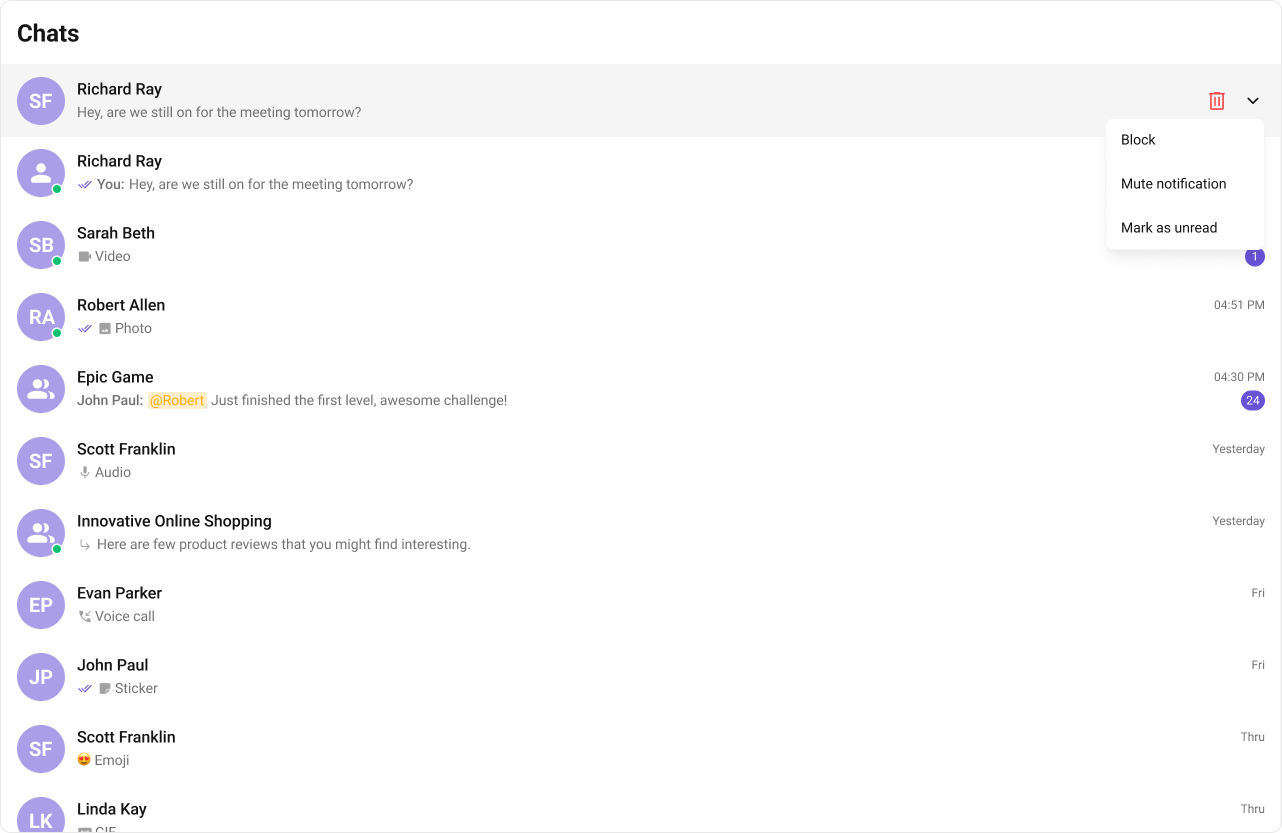
Build and customize the conversations list in your React app. This page is for developers who need a complete, step-by-step guide to rendering conversations, handling actions, and customizing the UI.

When to use this

  • You need a list of recent conversations for the logged-in user.
  • You want unread counts, last message previews, and typing indicators.
  • You want to handle selection or navigation when a conversation is clicked.
  • You need to filter conversations by type or tags.
  • You want to customize list items, header, and actions.

Usage

Integrate the component

  • What you’re changing: Add the conversations list to your UI.
  • File: src/ConversationsDemo.tsx
  • Applies to: CometChatConversations
  • Default behavior: Renders a scrollable list of recent conversations.
  • Override: Add props such as onItemClick or selectionMode.
  • Verify: Conversation tiles render with avatars, names, last messages, and unread counts.
import {
  CometChatConversations,
  TitleAlignment,
} from "@cometchat/chat-uikit-react";

function ConversationsDemo() {
  return (
    <div className="conversations" style={{ width: "100%", height: "100%" }}>
      <CometChatConversations />
    </div>
  );
}

export default ConversationsDemo;
What this does: Renders the conversations list with default UI behavior.

Actions

  • What you’re changing: Override default behavior by handling component actions.
  • File: Any React module
  • Applies to: onItemClick, onSelect, onError, onSearchBarClicked
  • Default behavior: Actions emit events but do not change your app state.
  • Override: Provide callbacks to update your UI or app state.
  • Verify: Your handlers run when the action fires.

OnItemClick

import { CometChatConversations } from "@cometchat/chat-uikit-react";
import { CometChat } from "@cometchat/chat-sdk-javascript";

const getOnItemClick = (conversation: CometChat.Conversation) => {
  console.log("ItemClick:", conversation);
};

<CometChatConversations onItemClick={getOnItemClick} />;
What this does: Handles a conversation click and lets you update app state.

OnSelect

import {
  CometChatConversations,
  SelectionMode,
} from "@cometchat/chat-uikit-react";
import { CometChat } from "@cometchat/chat-sdk-javascript";

const getOnSelect = (
  conversation: CometChat.Conversation,
  selected: boolean
) => {
  console.log("Selected:", conversation.getConversationId(), selected);
};

<CometChatConversations
  selectionMode={SelectionMode.multiple}
  onSelect={getOnSelect}
/>;
What this does: Handles list selection changes in multi-select mode.

OnError

import { CometChatConversations } from "@cometchat/chat-uikit-react";
import { CometChat } from "@cometchat/chat-sdk-javascript";

const handleOnError = (error: CometChat.CometChatException) => {
  console.log("Error:", error);
};

<CometChatConversations onError={handleOnError} />;
What this does: Captures and logs errors emitted by the component.

onSearchBarClicked

import { CometChatConversations } from "@cometchat/chat-uikit-react";

const handleSearchClick = () => {
  console.log("Search bar clicked");
};

<CometChatConversations onSearchBarClicked={handleSearchClick} />;
What this does: Triggers your handler when users click the search bar.

Filters

  • What you’re changing: Filter or limit the conversations list.
  • File: Any React module
  • Applies to: conversationsRequestBuilder
  • Default behavior: Fetches default conversation list.
  • Override: Use CometChat.ConversationsRequestBuilder to filter.
  • Verify: The list respects your limit or filters.
import { CometChatConversations } from "@cometchat/chat-uikit-react";
import { CometChat } from "@cometchat/chat-sdk-javascript";

<CometChatConversations
  conversationsRequestBuilder={new CometChat.ConversationsRequestBuilder().setLimit(
    10
  )}
/>;
What this does: Limits the list to 10 conversations per request.

Events

  • What you’re changing: Subscribe to conversation events.
  • File: Any React module
  • Applies to: CometChatConversationEvents
  • Default behavior: Events emit globally without app handling.
  • Override: Subscribe and react to event payloads.
  • Verify: Your handler runs on conversation events.
const ccConversationDeleted =
  CometChatConversationEvents.ccConversationDeleted.subscribe(
    (conversation: CometChat.Conversation) => {
      // Your code here
    }
  );
What this does: Subscribes to conversation deletion events.
ccConversationDeleted?.unsubscribe();
What this does: Cleans up the event subscription.

Customization

Style

  • What you’re changing: Override CSS for the conversations list.
  • File: Global stylesheet (for example src/App.css)
  • Applies to: .cometchat-conversations selectors
  • Default behavior: UI Kit default styles.
  • Override: Use CSS overrides.
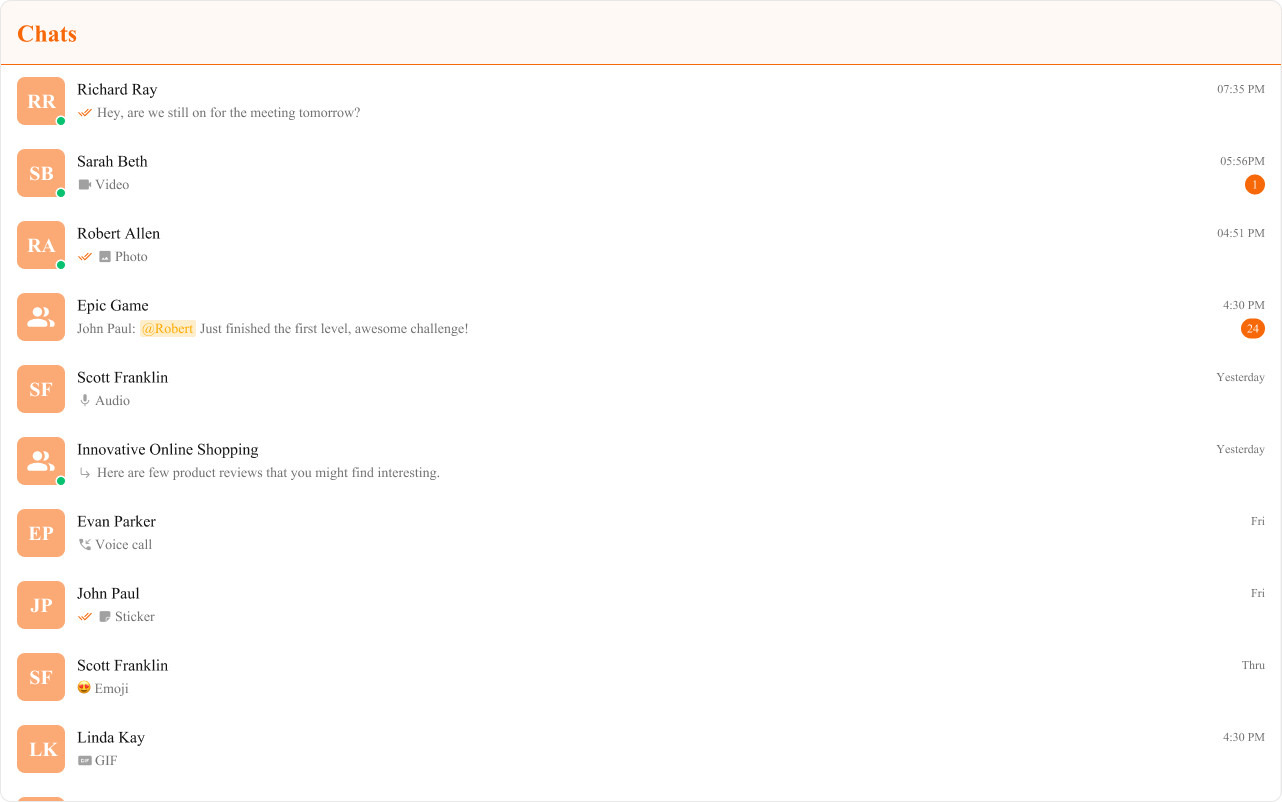
  • Verify: Fonts, colors, and badges update.
<CometChatConversations />
What this does: Applies custom typography and color styling to the conversations list.

Functionality

  • What you’re changing: Adjust built-in UI behavior with props.
  • File: Any React module
  • Applies to: Conversations props
  • Default behavior: UI Kit default behavior.
  • Override: Use props listed below.
  • Verify: UI changes reflect the prop values.
<div className="conversations" style={{ width: "100%", height: "100%" }}>
  <CometChatConversations title="Your Custom Title" />
</div>
What this does: Sets a custom title for the conversations header.
PropertyDescriptionCode
Hide ReceiptsDisables read receipts in the listhideReceipts={false}
Hide ErrorHides default and custom error viewshideError={true}
Hide Delete ConversationHides delete action in the menuhideDeleteConversation={false}
Hide User StatusHides online status indicatorhideUserStatus={true}
Hide Group TypeHides group type iconhideGroupType={false}
Show Search BarShows the search barshowSearchBar={true}
Active ConversationHighlights the active conversationactiveConversation={activeConversation}
Selection ModeEnables multi-selectselectionMode={SelectionMode.multiple}
Disable Sound For MessagesDisables incoming message soundsdisableSoundForMessages={false}
Custom Sound For MessagesCustom incoming message soundcustomSoundForMessages="Your custom sound url"
Search ViewCustom search viewsearchView={<>Custom Search View</>}
Loading ViewCustom loading viewloadingView={<>Custom Loading View</>}
Empty ViewCustom empty stateemptyView={<>Custom Empty View</>}
Error ViewCustom error stateerrorView={<>Custom Error View</>}

Advanced views

ItemView

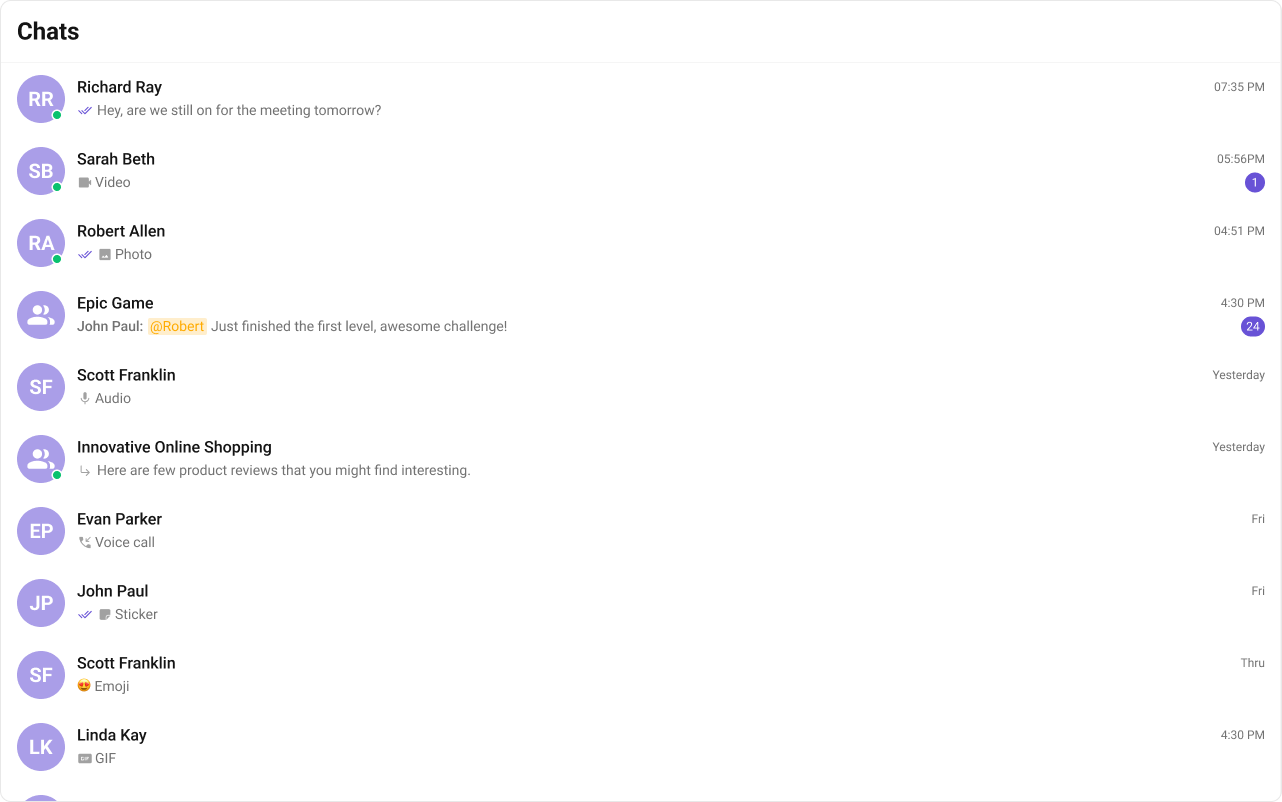
  • What you’re changing: Replace the default list item with a custom view.
  • File: Any React module
  • Applies to: itemView
  • Default behavior: UI Kit default list item layout.
  • Override: Return a custom CometChatListItem.
  • Verify: List items render with your custom UI.
import { CometChat } from "@cometchat/chat-sdk-javascript";
import {
  CometChatListItem,
  CometChatConversations,
} from "@cometchat/chat-uikit-react";

const getItemView = (conversation: CometChat.Conversation) => {
  const title = conversation.getConversationWith().getName();
  const timestamp = conversation?.getLastMessage()?.getSentAt();

  return (
    <CometChatListItem
      title={title}
      avatarName={title}
      id={conversation.getConversationId()}
      trailingView={<CometChatDate timestamp={timestamp} />}
      onListItemClicked={() => {
        // Logic here
      }}
    />
  );
};

<CometChatConversations itemView={getItemView} />;
What this does: Replaces the default item layout with a custom list item view.

LeadingView

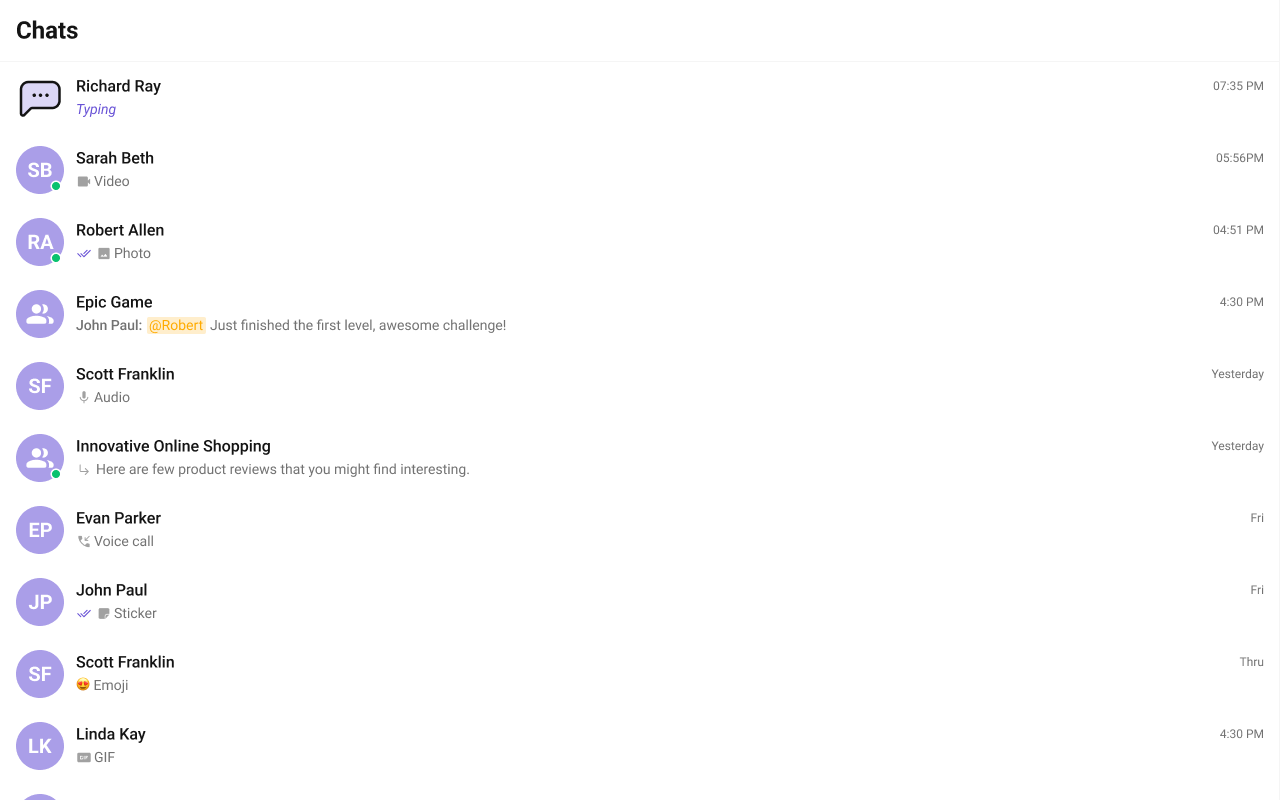
  • What you’re changing: Replace the leading view (avatar area).
  • File: Any React module
  • Applies to: leadingView
  • Default behavior: Default avatar and status UI.
  • Override: Return a custom leading view.
  • Verify: The leading area renders your custom UI.
import React from "react";
import { CometChat } from "@cometchat/chat-sdk-javascript";
import {
  CometChatConversations,
  CometChatAvatar,
} from "@cometchat/chat-uikit-react";
import { useEffect, useRef, useState } from "react";

const [isTyping, setIsTyping] = useState<boolean>(false);
const typingObjRef = useRef<CometChat.TypingIndicator | null>(null);

useEffect(() => {
  const messageListenerId: string = "typing_demo_" + new Date().getTime();
  CometChat.addMessageListener(
    messageListenerId,
    new CometChat.MessageListener({
      onTypingStarted: (typingIndicator: CometChat.TypingIndicator) => {
        typingObjRef.current = typingIndicator;
        setIsTyping(true);
      },
      onTypingEnded: (typingIndicator: CometChat.TypingIndicator) => {
        if (
          typingObjRef.current &&
          typingObjRef.current.getSender().getUid() ===
            typingIndicator.getSender().getUid()
        ) {
          typingObjRef.current = null;
          setIsTyping(false);
        }
      },
    })
  );
  return () => {
    CometChat.removeMessageListener(messageListenerId);
  };
}, [setIsTyping]);

const CustomLeadingView = (conversation: CometChat.Conversation) => {
  const conversationObj = conversation.getConversationWith();
  const isUser = conversationObj instanceof CometChat.User;
  const isGroup = conversationObj instanceof CometChat.Group;

  const isMyTyping = isUser
    ? (conversationObj as CometChat.User).getUid() ===
        typingObjRef.current?.getSender().getUid()
    : isGroup &&
      (conversationObj as CometChat.Group).getGuid() ===
        typingObjRef.current?.getReceiverId();

  const avatar = isUser
    ? (conversationObj as CometChat.User).getAvatar()
    : (conversationObj as CometChat.Group).getIcon();
  const name = isTyping && isMyTyping ? undefined : conversationObj.getName();
  const image = isTyping && isMyTyping ? "TYPING_ICON_HERE" : avatar;

  return (
    <div className="conversations__leading-view">
      <CometChatAvatar image={image} name={name} />
    </div>
  );
};

<CometChatConversations leadingView={CustomLeadingView} />;
What this does: Replaces the avatar area with a custom view that can show typing state.

TrailingView

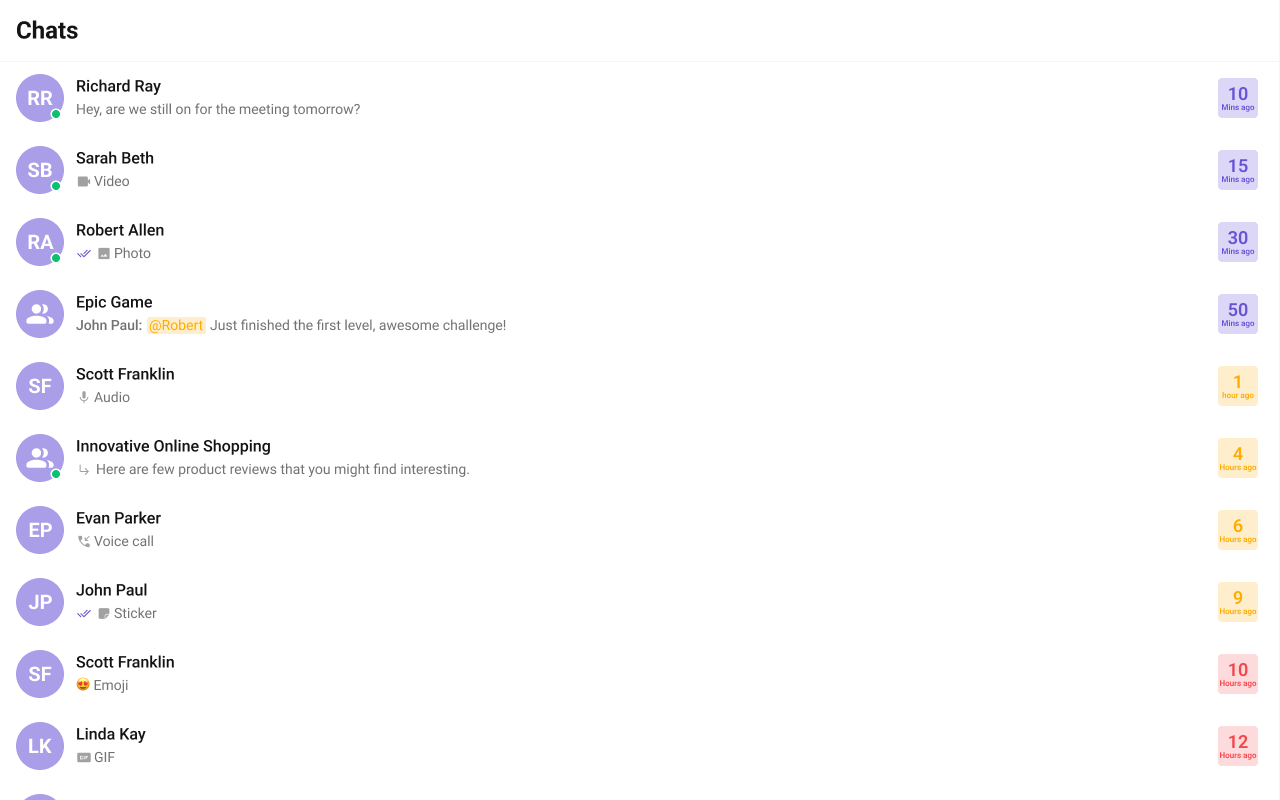
  • What you’re changing: Replace the trailing view (right side of list item).
  • File: Any React module
  • Applies to: trailingView
  • Default behavior: Default timestamp and badge UI.
  • Override: Return a custom trailing view.
  • Verify: The trailing area renders your custom UI.
import React from "react";
import { CometChat } from "@cometchat/chat-sdk-javascript";
import { CometChatConversations } from "@cometchat/chat-uikit-react";

const CustomTrailingButtonView = (conv: CometChat.Conversation) => {
  if (!conv.getLastMessage()) {
    return <></>;
  }
  const timestamp = conv.getLastMessage()?.getSentAt() * 1000;
  const now = new Date();
  const time = new Date(timestamp);

  const diffInMs = now.getTime() - time.getTime();
  const diffInMinutes = Math.floor(diffInMs / (1000 * 60));
  const diffInHours = Math.floor(diffInMs / (1000 * 60 * 60));

  let backgroundColorClass = "conversations__trailing-view-min";
  let topLabel = `${diffInMinutes}`;
  let bottomLabel = `${diffInMinutes === 1 ? "Min ago" : "Mins ago"}`;

  if (diffInHours >= 1 && diffInHours <= 10) {
    backgroundColorClass = "conversations__trailing-view-hour";
    topLabel = `${diffInHours}`;
    bottomLabel = `${diffInHours === 1 ? "Hour ago" : "Hours ago"}`;
  } else if (diffInHours > 10) {
    backgroundColorClass = "conversations__trailing-view-date";
    topLabel = time.toLocaleDateString("en-US", { day: "numeric" });
    bottomLabel = time.toLocaleDateString("en-US", {
      month: "short",
      year: "numeric",
    });
  }
  return (
    <div className={`conversations__trailing-view ${backgroundColorClass}`}>
      <span className="conversations__trailing-view-time">{topLabel}</span>
      <span className="conversations__trailing-view-status">{bottomLabel}</span>
    </div>
  );
};

<CometChatConversations trailingView={CustomTrailingButtonView} />;
What this does: Replaces the trailing area with a custom time and status panel.

TextFormatters

  • What you’re changing: Add custom text formatters to conversation previews.
  • File: Any React module
  • Applies to: textFormatters
  • Default behavior: Uses default text formatters.
  • Override: Provide a list of formatter instances.
  • Verify: Custom formatting appears in list items.
import { CometChatTextFormatter } from "@cometchat/chat-uikit-react";
import DialogHelper from "./Dialog";
import { CometChat } from "@cometchat/chat-sdk-javascript";

class ShortcutFormatter extends CometChatTextFormatter {
  private shortcuts: { [key: string]: string } = {};
  private dialogIsOpen: boolean = false;
  private dialogHelper = new DialogHelper();
  private currentShortcut: string | null = null;

  constructor() {
    super();
    this.setTrackingCharacter("!");
    CometChat.callExtension("message-shortcuts", "GET", "v1/fetch", undefined)
      .then((data: any) => {
        if (data && data.shortcuts) {
          this.shortcuts = data.shortcuts;
        }
      })
      .catch((error) => console.log("error fetching shortcuts", error));
  }

  onKeyDown(event: KeyboardEvent) {
    const caretPosition =
      this.currentCaretPosition instanceof Selection
        ? this.currentCaretPosition.anchorOffset
        : 0;
    const textBeforeCaret = this.getTextBeforeCaret(caretPosition);

    const match = textBeforeCaret.match(/!([a-zA-Z]+)$/);
    if (match) {
      const shortcut = match[0];
      const replacement = this.shortcuts[shortcut];
      if (replacement) {
        if (this.dialogIsOpen && this.currentShortcut !== shortcut) {
          this.closeDialog();
        }
        this.openDialog(replacement, shortcut);
      }
    }
  }

  getCaretPosition() {
    if (!this.currentCaretPosition?.rangeCount) return { x: 0, y: 0 };
    const range = this.currentCaretPosition?.getRangeAt(0);
    const rect = range.getBoundingClientRect();
    return {
      x: rect.left,
      y: rect.top,
    };
  }

  openDialog(buttonText: string, shortcut: string) {
    this.dialogHelper.createDialog(
      () => this.handleButtonClick(buttonText),
      buttonText
    );
    this.dialogIsOpen = true;
    this.currentShortcut = shortcut;
  }

  closeDialog() {
    this.dialogHelper.closeDialog();
    this.dialogIsOpen = false;
    this.currentShortcut = null;
  }

  handleButtonClick = (buttonText: string) => {
    if (this.currentCaretPosition && this.currentRange) {
      const shortcut = Object.keys(this.shortcuts).find(
        (key) => this.shortcuts[key] === buttonText
      );
      if (shortcut) {
        const replacement = this.shortcuts[shortcut];
        this.addAtCaretPosition(
          replacement,
          this.currentCaretPosition,
          this.currentRange
        );
      }
    }
    if (this.dialogIsOpen) {
      this.closeDialog();
    }
  };

  getFormattedText(text: string): string {
    return text;
  }

  private getTextBeforeCaret(caretPosition: number): string {
    if (
      this.currentRange &&
      this.currentRange.startContainer &&
      typeof this.currentRange.startContainer.textContent === "string"
    ) {
      const textContent = this.currentRange.startContainer.textContent;
      if (textContent.length >= caretPosition) {
        return textContent.substring(0, caretPosition);
      }
    }
    return "";
  }
}

export default ShortcutFormatter;
What this does: Adds a custom text formatter that expands shortcuts and displays a dialog.

HeaderView

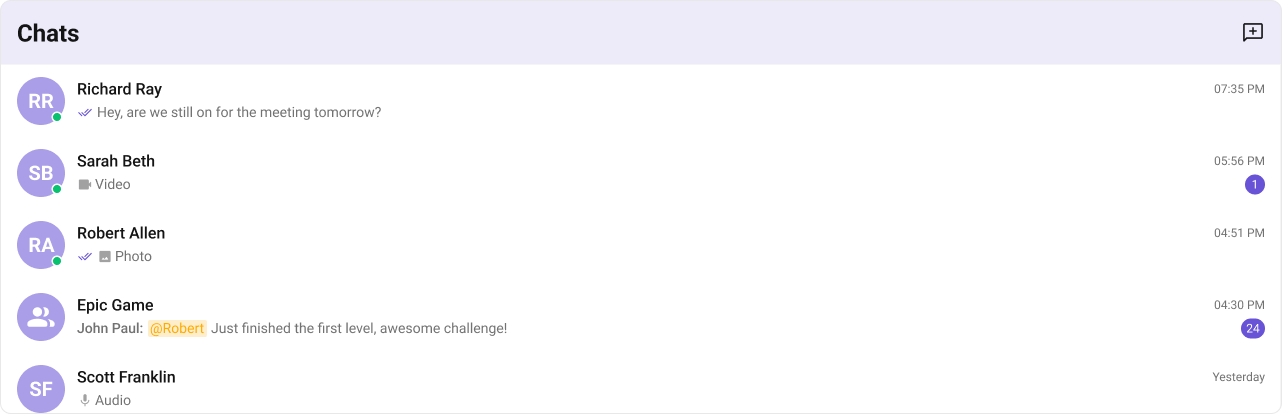
  • What you’re changing: Replace the default header UI.
  • File: Any React module
  • Applies to: headerView
  • Default behavior: Default title and actions.
  • Override: Provide a custom header view.
  • Verify: Header renders custom title and button.
import {
  CometChatButton,
  CometChatConversations,
} from "@cometchat/chat-uikit-react";

const getHeaderView = () => {
  return (
    <div className="conversations__header">
      <div className="conversations__header__title">CHATS</div>
      <CometChatButton
        onClick={() => {
          // logic here
        }}
        iconURL={ICON_URL}
      />
    </div>
  );
};

<CometChatConversations headerView={getHeaderView()} />;
What this does: Replaces the header with a custom title and action button.

Last message date time format

  • What you’re changing: Customize the timestamp format in the list.
  • File: Any React module
  • Applies to: lastMessageDateTimeFormat
  • Default behavior: Uses the component default format or global localization.
  • Override: Pass a CalendarObject.
  • Verify: Timestamps display in your format.
new CalendarObject({
  today: `hh:mm A`,
  yesterday: `[yesterday]`,
  otherDays: `DD/MM/YYYY`,
});
What this does: Shows the default date format pattern.
import {
  CometChatConversations,
  CalendarObject,
} from "@cometchat/chat-uikit-react";

function getDateFormat() {
  const dateFormat = new CalendarObject({
    today: `DD MMM, hh:mm A`,
    yesterday: `DD MMM, hh:mm A`,
    otherDays: `DD MMM, hh:mm A`,
  });
  return dateFormat;
}

<CometChatConversations lastMessageDateTimeFormat={getDateFormat()} />;
What this does: Applies a custom date format to conversation timestamps.

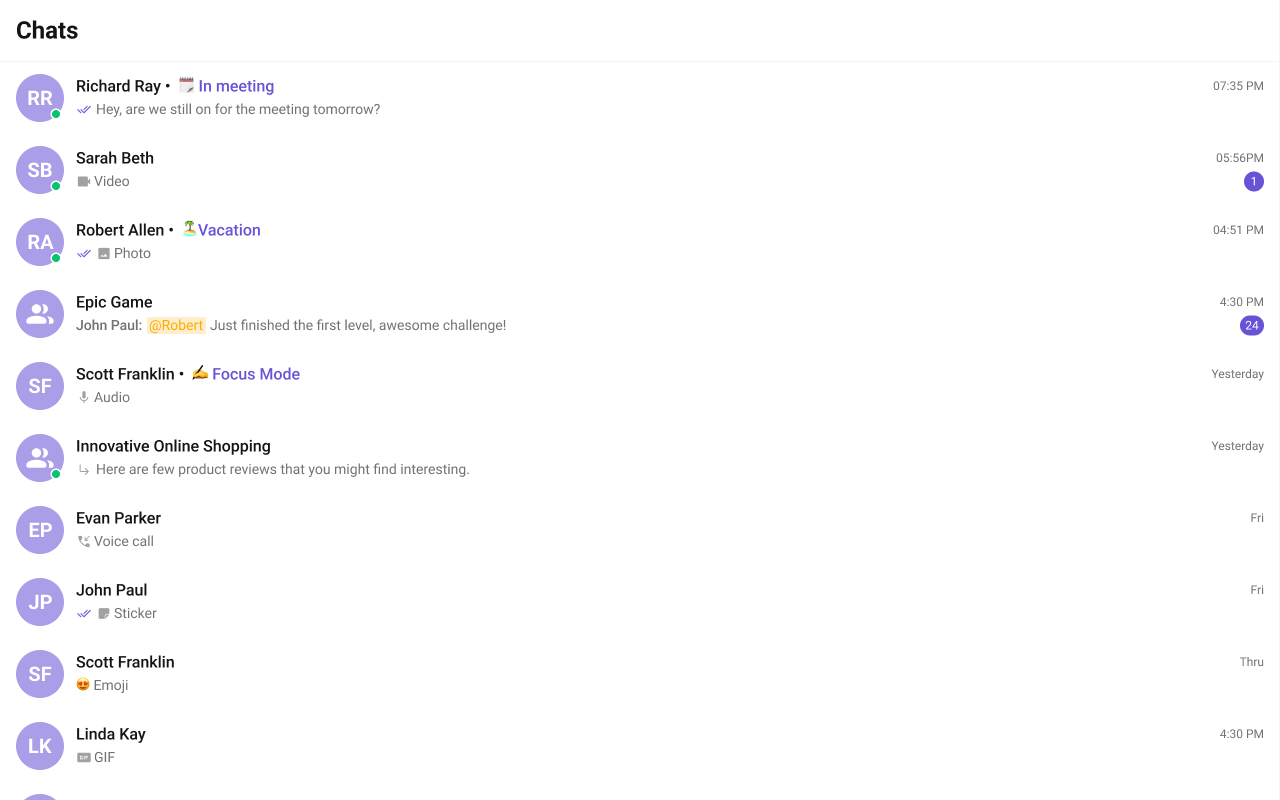
TitleView

  • What you’re changing: Replace the title area in list items.
  • File: Any React module
  • Applies to: titleView
  • Default behavior: Default title view.
  • Override: Return custom JSX for title.
  • Verify: The title view renders your custom layout.
import React from "react";
import { CometChat } from "@cometchat/chat-sdk-javascript";
import { CometChatConversations } from "@cometchat/chat-uikit-react";

const customTitleView = (conversation: CometChat.Conversation) => {
  let user =
    conversation.getConversationType() == "user"
      ? (conversation.getConversationWith() as CometChat.User)
      : undefined;
  return (
    <div className="conversations__title-view">
      <span className="conversations__title-view-name">
        {user
          ? conversation.getConversationWith().getName() + " • "
          : conversation.getConversationWith().getName()}
      </span>
      {user ? (
        <span className="conversations__title-view-status">
          {user.getStatusMessage()}
        </span>
      ) : null}
    </div>
  );
};

<CometChatConversations titleView={customTitleView} />;
What this does: Customizes the title text and status line in each list item.

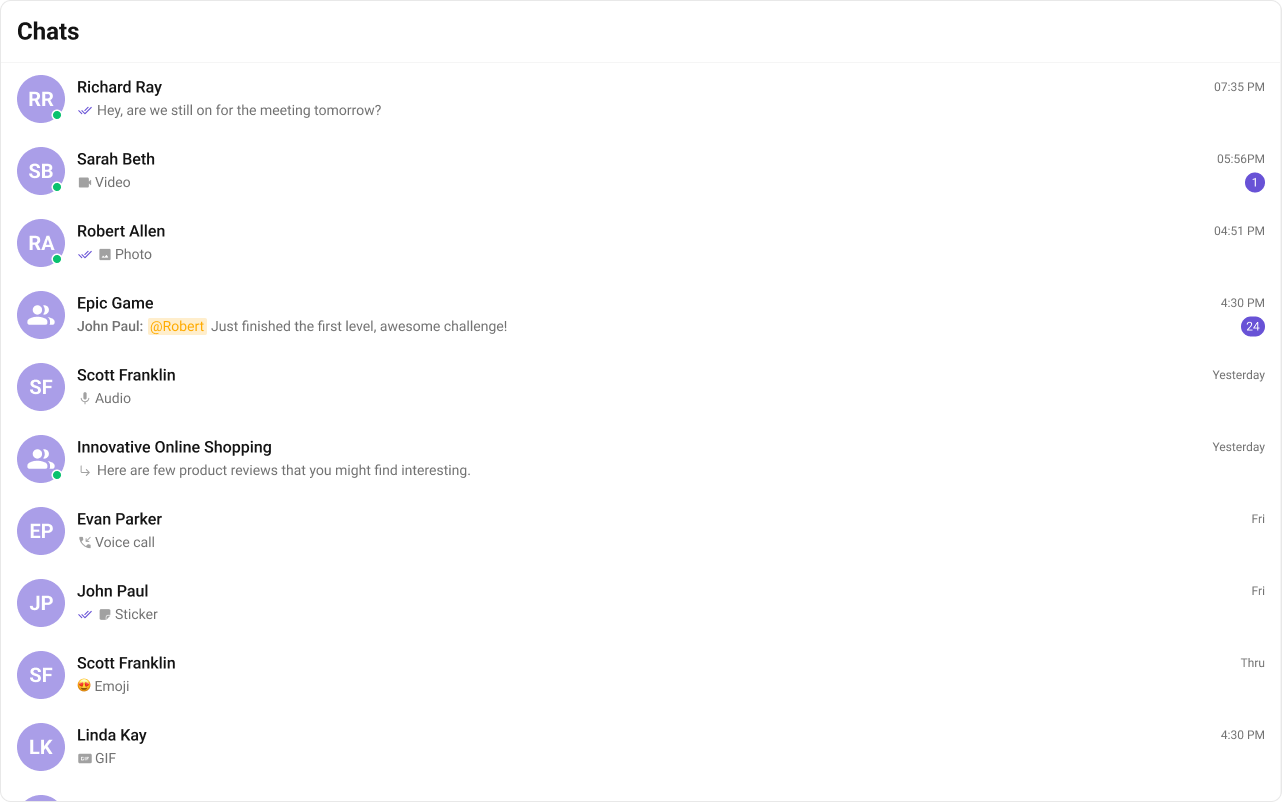
SubtitleView

  • What you’re changing: Replace the subtitle area in list items.
  • File: Any React module
  • Applies to: subtitleView
  • Default behavior: Default subtitle with last message.
  • Override: Return custom subtitle JSX.
  • Verify: Subtitle area shows your custom content.
import { CometChat } from "@cometchat/chat-sdk-javascript";
import { CometChatConversations } from "@cometchat/chat-uikit-react";

const subtitleView = (conversation: CometChat.Conversation) => {
  if (conversation.getConversationType() === "user") {
    return (
      <>
        Last Message at:{" "}
        {getFormattedTimestamp(
          (conversation.getConversationWith() as CometChat.User).getLastActiveAt()
        )}
      </>
    );
  } else {
    return (
      <>
        Created at:{" "}
        {getFormattedTimestamp(
          (conversation.getConversationWith() as CometChat.Group).getCreatedAt()
        )}
      </>
    );
  }
};

function getFormattedTimestamp(timestamp: number): string {
  const date = new Date(timestamp * 1000);
  return date.toLocaleString();
}

<CometChatConversations subtitleView={subtitleView} />;
What this does: Replaces the subtitle with custom date content for users or groups.

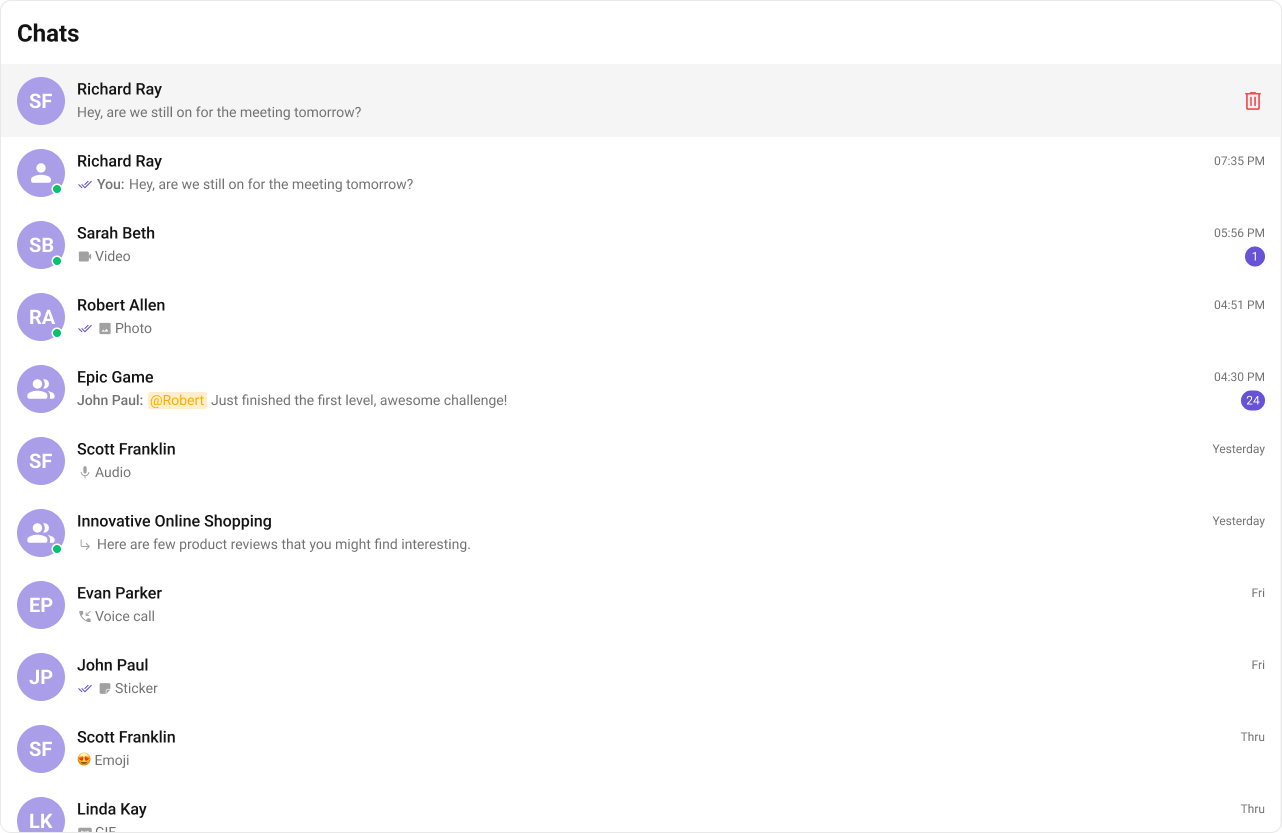
Options

  • What you’re changing: Customize the context menu options for each conversation.
  • File: Any React module
  • Applies to: options
  • Default behavior: Default menu actions.
  • Override: Provide your own CometChatOption list.
  • Verify: Custom options appear in the menu.
import {
  CometChatOption,
  CometChatConversations,
} from "@cometchat/chat-uikit-react";

const getOptions = (conversation: CometChat.Conversation) => {
  return [
    new CometChatOption({
      title: "Delete",
      iconURL: deleteIcon,
      id: "delete",
      onClick: () => {
        // Logic here
      },
    }),
    new CometChatOption({
      title: "Mute Notification",
      id: "mute",
      onClick: () => {
        // Logic here
      },
    }),
    new CometChatOption({
      title: "Mark as Unread",
      id: "unread",
      onClick: () => {
        // Logic here
      },
    }),
    new CometChatOption({
      title: "Block",
      id: "block",
      onClick: () => {
        // Logic here
      },
    }),
  ];
};

<CometChatConversations options={getOptions} />;
What this does: Replaces the default menu options and styles the menu.
NameDescription
idUnique identifier for each option.
titleDisplay label for the option.
iconURLIcon asset URL.
onClickHandler invoked when the option is selected.

Customization matrix

What you want to changeWhereProperty/APIExample
Handle item clickCometChatConversationsonItemClickonItemClick={(c) => setActive(c)}
Enable multi-selectCometChatConversationsselectionModeselectionMode={SelectionMode.multiple}
Filter conversationsCometChatConversationsconversationsRequestBuildernew CometChat.ConversationsRequestBuilder().setLimit(10)
Custom list itemCometChatConversationsitemViewitemView={(c) => <MyItem />}
Custom headerCometChatConversationsheaderViewheaderView={myHeader}
Custom stylesGlobal CSS.cometchat-conversations.cometchat-conversations { ... }

Common pitfalls and fixes

SymptomCauseFix
Component does not renderCometChatUIKit.init() not called or not awaitedEnsure init completes before rendering.
Component renders but shows no dataUser not logged inCall CometChatUIKit.login("UID") after init.
onItemClick not firingWrong prop nameUse onItemClick.
Custom view not appearingReturning null or undefinedReturn valid JSX from view prop.
SSR hydration errorUI Kit uses browser APIsRender in useEffect or use ssr: false in Next.js.
Conversations list empty after loginFilters too restrictiveRemove or adjust conversationsRequestBuilder.
Events not receivedListener not subscribed or unsubscribed earlySubscribe in useEffect and unsubscribe in cleanup.

FAQ

Can I show only group conversations? Yes. Use conversationsRequestBuilder to filter by type. How do I customize the list item layout? Use itemView, leadingView, titleView, subtitleView, or trailingView.

Next steps