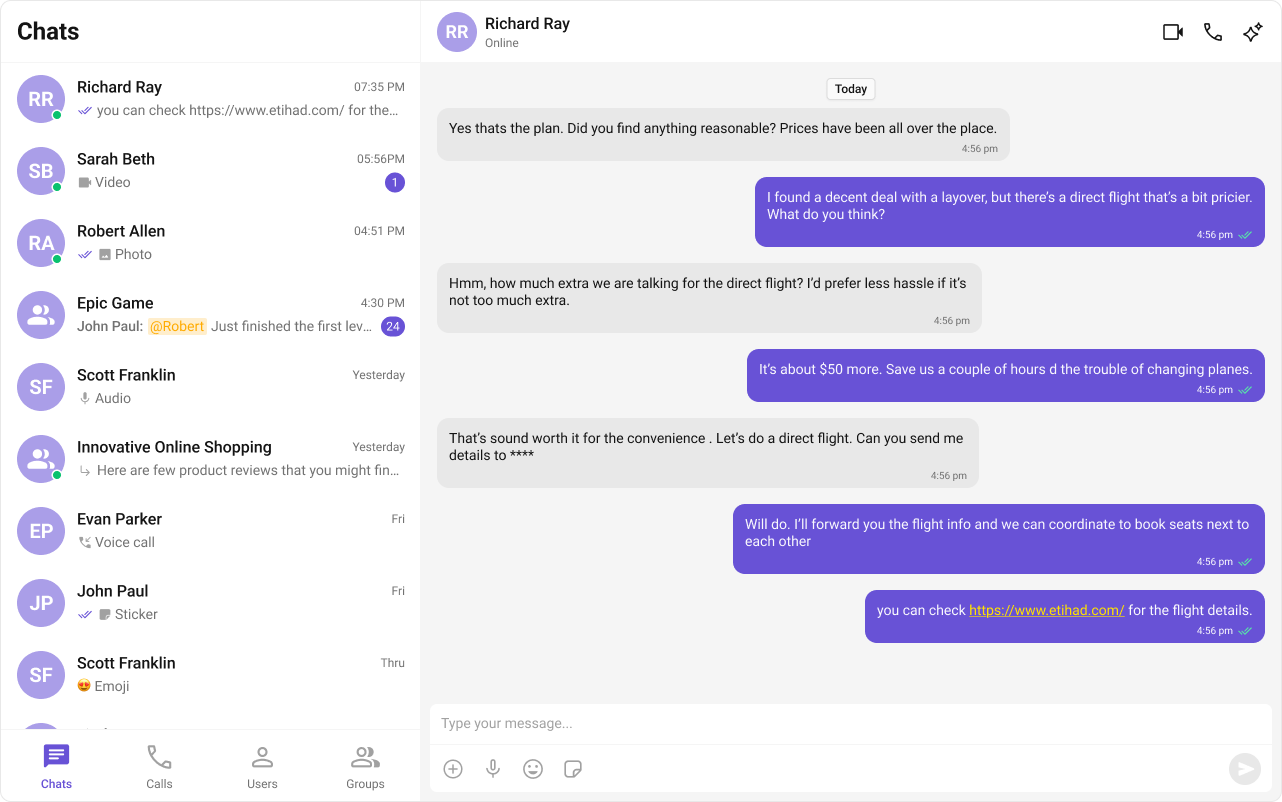
Package: @cometchat/chat-uikit-reactFramework: Astro (with @astrojs/react islands)Key component: CometChatFullScreenViewRequired setup: CometChatUIKit.init(UIKitSettings) then CometChatUIKit.login("UID") — use client:only="react" directiveParent guide: Astro Integration This guide shows how to build a tab‑based messaging UI in Astro using the CometChat React UI Kit. The interface includes sections for Chats, Calls, Users, and Groups with a message panel.
User Interface Preview Layout structure:
Sidebar – conversations, users, groups, or call logs
Messages – header, list, and composer
Tabs – switch between Chats, Calls, Users, and Groups
Prerequisites
Astro project with React integration
CometChat credentials in .env
Create or open an Astro project
npm create astro@latest cd < my-astro-ap p > npm install
If you already have the sample astro-tab-based-chat project, open it instead.
Add React and install CometChat UI Kit
npx astro add react
npm i @cometchat/chat-uikit-react react react-dom
Add required environment variables to .env: PUBLIC_COMETCHAT_APP_ID = your_app_id PUBLIC_COMETCHAT_REGION = your_region PUBLIC_COMETCHAT_AUTH_KEY = your_auth_key # Login UID for tabbed example PUBLIC_COMETCHAT_LOGIN_UID = cometchat-uid-3
Use Auth Tokens in production instead of Auth Keys.
Initialize CometChat (src/lib/cometchat-init.js)
Create src/lib/cometchat-init.js to initialize the UI Kit and provide a helper for login. src/lib/cometchat-init.js
import { CometChatUIKit , UIKitSettingsBuilder } from "@cometchat/chat-uikit-react" ; const APP_ID = import . meta . env . PUBLIC_COMETCHAT_APP_ID ; const REGION = import . meta . env . PUBLIC_COMETCHAT_REGION ; const AUTH_KEY = import . meta . env . PUBLIC_COMETCHAT_AUTH_KEY ; export async function initCometChat () { if ( ! APP_ID || ! REGION || ! AUTH_KEY ) { throw new Error ( "Missing PUBLIC_COMETCHAT_* env vars." ); } const settings = new UIKitSettingsBuilder () . setAppId ( APP_ID ) . setRegion ( REGION ) . setAuthKey ( AUTH_KEY ) // use Auth Tokens in prod . subscribePresenceForAllUsers () . build (); await CometChatUIKit . init ( settings ); } export async function ensureLogin ( uid ) { const existing = await CometChatUIKit . getLoggedinUser (); if ( ! existing ) await CometChatUIKit . login ( uid ); }
Create the Tabs component (src/components/CometChatTabs.jsx)
A simple bottom tab bar used to switch between sections. src/components/CometChatTabs.jsx
import { useState } from "react" ; // CSS styling is handled by tabs-layout.css imported in the main page const chatsIcon = "/assets/chats.svg" ; const callsIcon = "/assets/calls.svg" ; const usersIcon = "/assets/users.svg" ; const groupsIcon = "/assets/groups.svg" ; export default function CometChatTabs ({ activeTab = "chats" , onTabClicked = () => {} }) { const [ hover , setHover ] = useState ( "" ); const items = [ { name: "CHATS" , icon: chatsIcon }, { name: "CALLS" , icon: callsIcon }, { name: "USERS" , icon: usersIcon }, { name: "GROUPS" , icon: groupsIcon }, ]; return ( < div className = "cometchat-tab-component" > { items . map (( t ) => { const key = t . name . toLowerCase (); const active = activeTab === key || hover === key ; return ( < div key = { t . name } className = "cometchat-tab-component__tab" onClick = { () => onTabClicked ({ name: t . name }) } onMouseEnter = { () => setHover ( key ) } onMouseLeave = { () => setHover ( "" ) } > { /* if icons not present, this still renders a label-only tab */ } { t . icon ? ( < div className = { "cometchat-tab-component__tab-icon " + ( active ? "cometchat-tab-component__tab-icon-active" : "" ) } style = { { WebkitMaskImage: `url( ${ t . icon } )` , maskImage: `url( ${ t . icon } )` , } } /> ) : null } < div className = { "cometchat-tab-component__tab-text " + ( active ? "cometchat-tab-component__tab-text-active" : "" ) } > { t . name } </ div > </ div > ); }) } </ div > ); }
Build the React island (src/components/TabbedChat.jsx)
This component renders the sidebar list based on the active tab and shows the message panel on the right. src/components/TabbedChat.jsx
import { useEffect , useState } from "react" ; import { CometChatUIKit , CometChatConversations , CometChatUsers , CometChatGroups , CometChatCallLogs , CometChatMessageHeader , CometChatMessageList , CometChatMessageComposer , } from "@cometchat/chat-uikit-react" ; import "@cometchat/chat-uikit-react/css-variables.css" ; import CometChatTabs from "./CometChatTabs.jsx" ; import { initCometChat } from "../lib/cometchat-init.js" ; const LOGIN_UID = import . meta . env . PUBLIC_COMETCHAT_LOGIN_UID ; // UID of the user to log in as export default function TabbedChat () { const [ phase , setPhase ] = useState ( "boot" ); // boot | ready | error const [ errorMsg , setErrorMsg ] = useState ( "" ); const [ activeTab , setActiveTab ] = useState ( "chats" ); // chats | calls | users | groups const [ selectedUser , setSelectedUser ] = useState ( null ); const [ selectedGroup , setSelectedGroup ] = useState ( null ); useEffect (() => { let cancelled = false ; ( async () => { try { // Use the centralized init function await initCometChat (); // Check if current logged-in user matches the desired UID let me = await CometChatUIKit . getLoggedinUser (); if ( ! me || me . getUid () !== LOGIN_UID ) { // Logout current user if different UID, then login with correct UID if ( me ) { await CometChatUIKit . logout (); } me = await CometChatUIKit . login ( LOGIN_UID ); } if ( ! cancelled ) setPhase ( "ready" ); } catch ( e ) { console . error ( "TabbedChat init error:" , e ); if ( ! cancelled ) { setErrorMsg ( String ( e ?. message || e )); setPhase ( "error" ); } } })(); return () => { cancelled = true ; }; }, [ LOGIN_UID ]); // Add LOGIN_UID as dependency so effect runs when UID changes const handleSelect = ( item ) => { // item can be Conversation, User, Group, or Call const maybeConv = item ?. getConversationWith ? item . getConversationWith () : null ; const picked = maybeConv || item ; if ( picked ?. getUid ) { setSelectedUser ( picked ); setSelectedGroup ( null ); setActiveTab ( "chats" ); // keep in chats context } else if ( picked ?. getGuid ) { setSelectedGroup ( picked ); setSelectedUser ( null ); setActiveTab ( "chats" ); // show messages in same area } else { // For calls tab, we don’t open message panel setSelectedUser ( null ); setSelectedGroup ( null ); } }; if ( phase === "boot" ) return < div style = { { padding: 16 } } > Loading… </ div > ; if ( phase === "error" ) return < div style = { { padding: 16 , color: "crimson" } } >< b > CometChat error: </ b > { errorMsg } </ div > ; return ( < div className = "cc-tabbed" > { /* LEFT: Sidebar */ } < div className = "cc-tabbed__sidebar" > < div className = "cc-tabbed__list" > { activeTab === "chats" && ( < CometChatConversations onItemClick = { handleSelect } /> ) } { activeTab === "calls" && ( < CometChatCallLogs onItemClick = { ( call ) => { // If you integrate Calls SDK later, you can open call details here console . log ( "Call log clicked:" , call ); } } /> ) } { activeTab === "users" && ( < CometChatUsers onItemClick = { ( user ) => handleSelect ( user ) } /> ) } { activeTab === "groups" && ( < CometChatGroups onItemClick = { ( group ) => handleSelect ( group ) } /> ) } </ div > { /* Tabs bar at bottom */ } < CometChatTabs activeTab = { activeTab } onTabClicked = { ( t ) => setActiveTab ( t . name . toLowerCase ()) } /> </ div > { /* RIGHT: Messages panel (appears for chats/users/groups) */ } < div className = "cc-tabbed__main" > { activeTab === "calls" ? ( < div className = "cc-tabbed__empty" > Select a call log </ div > ) : selectedUser || selectedGroup ? ( <> < CometChatMessageHeader user = { selectedUser } group = { selectedGroup } /> < div className = "cc-tabbed__list-slot" > < CometChatMessageList user = { selectedUser } group = { selectedGroup } /> </ div > < CometChatMessageComposer user = { selectedUser } group = { selectedGroup } /> </> ) : ( < div className = "cc-tabbed__empty" > Select a conversation to start </ div > ) } </ div > </ div > ); }
Render the page (src/pages/index.astro)
Import the island and styles, then hydrate on the client. --- import TabbedChat from "../components/TabbedChat.jsx" ; import "../styles/tabs-layout.css" ; // the CSS from this setup // (optional) also import your existing globals.css if you have one import "../styles/globals.css" ; --- < html lang = "en" > < head > < meta charset = "utf-8" /> < title > Tabbed Messaging UI </ title > < meta name = "viewport" content = "width=device-width, initial-scale=1" /> </ head > < body > <!-- Client-only; CometChat needs browser APIs --> < TabbedChat client:only = "react" /> </ body > </ html >
Run and verify
Log in using PUBLIC_COMETCHAT_LOGIN_UID, switch tabs, and open a conversation to send messages.
Troubleshooting
Tabs not switching or empty lists
Ensure CometChatTabs is wired via onTabClicked and that the active tab state drives which list is rendered.
Verify .env contains PUBLIC_COMETCHAT_APP_ID, PUBLIC_COMETCHAT_REGION, PUBLIC_COMETCHAT_AUTH_KEY, and PUBLIC_COMETCHAT_LOGIN_UID.
No messages on right panel
The message panel shows only for Chats, Users, or Groups. Calls tab does not open a message panel.
Common Failure Modes
Symptom Cause Fix Component doesn’t render CometChatUIKit.init() not called or not awaitedEnsure init completes before rendering. See Methods Component renders but shows no data User not logged in Call CometChatUIKit.login("UID") after init CSS/theme not applied Missing CSS import Add @import url("@cometchat/chat-uikit-react/css-variables.css"); in your CSS Blank screen after login Component mounted before init/login completes Use state to conditionally render after login resolves Messages not loading Invalid user/group object passed Ensure you fetch the user/group via SDK before passing to components
Next Steps You can reuse src/lib/cometchat-init.js and swap the island component to build other experiences.