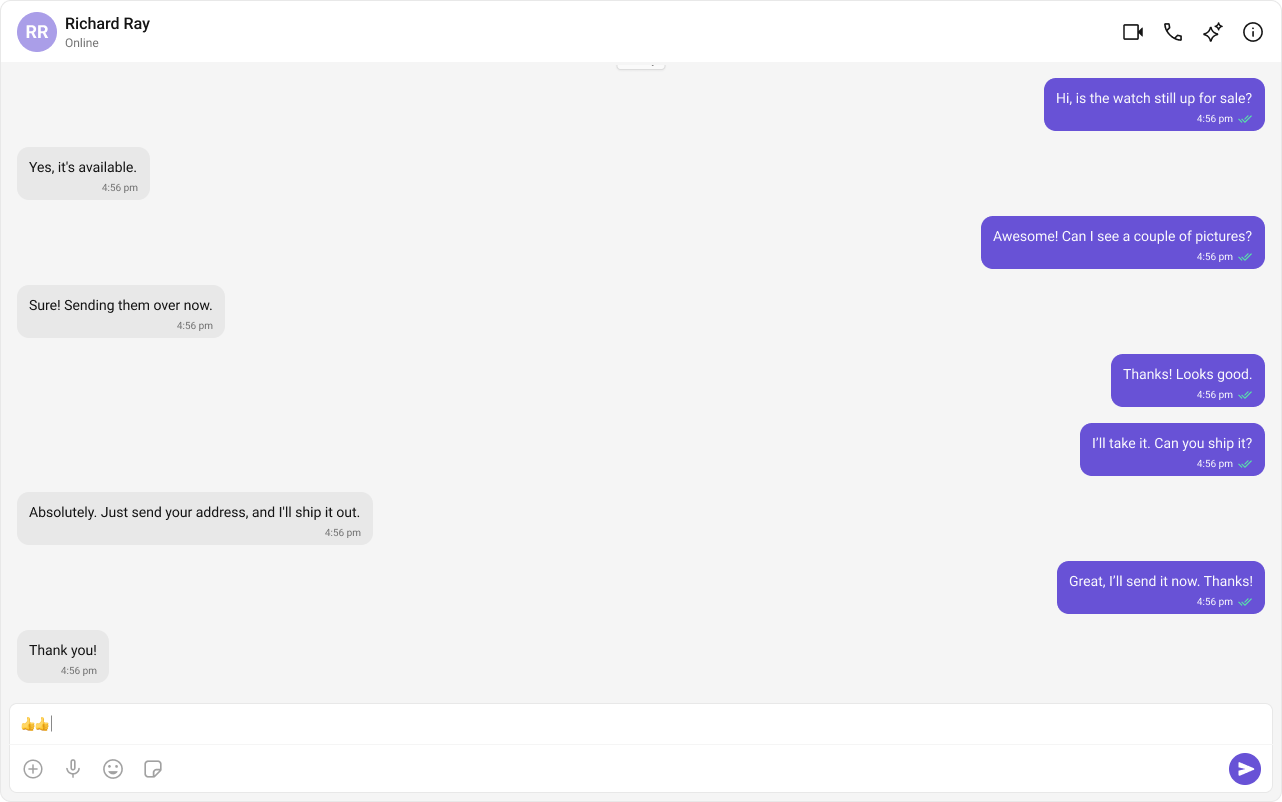
The One‑to‑One/Group chat layout focuses on a single conversation, ideal for support chats and private messaging. This guide uses Astro with React islands and the CometChat React UI Kit.
If you already have the sample astro-one-to-one-chat project, open it instead.
2
Add React and install CometChat UI Kit
Report incorrect code
Copy
Ask AI
npx astro add reactnpm i @cometchat/chat-uikit-react react react-dom
Add required environment variables to .env:
Report incorrect code
Copy
Ask AI
PUBLIC_COMETCHAT_APP_ID=your_app_idPUBLIC_COMETCHAT_REGION=your_regionPUBLIC_COMETCHAT_AUTH_KEY=your_auth_key# Login user and the peer for one-to-onePUBLIC_COMETCHAT_LOGIN_UID=cometchat-uid-3PUBLIC_COMETCHAT_TARGET_UID=cometchat-uid-1
Use Auth Tokens in production instead of Auth Keys.
3
Initialize CometChat (src/lib/cometchat-init.js)
Create src/lib/cometchat-init.js used by the island to initialize the UI Kit and handle login.
src/lib/cometchat-init.js
Report incorrect code
Copy
Ask AI
import { CometChatUIKit, UIKitSettingsBuilder } from "@cometchat/chat-uikit-react";const APP_ID = import.meta.env.PUBLIC_COMETCHAT_APP_ID;const REGION = import.meta.env.PUBLIC_COMETCHAT_REGION;const AUTH_KEY = import.meta.env.PUBLIC_COMETCHAT_AUTH_KEY;export async function initCometChat() { if (!APP_ID || !REGION || !AUTH_KEY) { throw new Error("Missing PUBLIC_COMETCHAT_* env vars."); } const settings = new UIKitSettingsBuilder() .setAppId(APP_ID) .setRegion(REGION) .setAuthKey(AUTH_KEY) // use Auth Tokens in prod .subscribePresenceForAllUsers() .build(); await CometChatUIKit.init(settings);}export async function ensureLogin(uid) { const existing = await CometChatUIKit.getLoggedinUser(); if (!existing) await CometChatUIKit.login(uid);}
4
Build the React island (src/components/OneToOneChat.jsx)
This component initializes CometChat, logs in the desired user, and loads a single peer (user or group) to chat with.
src/components/OneToOneChat.jsx
Report incorrect code
Copy
Ask AI
import { useEffect, useState } from "react";import { CometChatUIKit, CometChatMessageHeader, CometChatMessageList, CometChatMessageComposer,} from "@cometchat/chat-uikit-react";import "@cometchat/chat-uikit-react/css-variables.css";import { initCometChat, ensureLogin } from "../lib/cometchat-init.js";// current user + peerconst LOGIN_UID = import.meta.env.PUBLIC_COMETCHAT_LOGIN_UID; // e.g., cometchat-uid-3const TARGET_UID = import.meta.env.PUBLIC_COMETCHAT_TARGET_UID; // e.g., cometchat-uid-1export default function OneToOneChat() { const [phase, setPhase] = useState("boot"); // boot | ready | error const [errorMsg, setErrorMsg] = useState(""); const [peer, setPeer] = useState(null); // CometChat.User useEffect(() => { let cancelled = false; (async () => { try { if (!LOGIN_UID || !TARGET_UID) { throw new Error("Missing PUBLIC_COMETCHAT_LOGIN_UID or PUBLIC_COMETCHAT_TARGET_UID."); } // 1) Initialize CometChat await initCometChat(); // 2) Handle user switching - logout if different user try { const currentUser = await CometChatUIKit.getLoggedinUser(); if (currentUser && currentUser.uid !== LOGIN_UID) { await CometChatUIKit.logout(); } } catch (error) { // No existing user session } // 3) Ensure logged in as correct user await ensureLogin(LOGIN_UID); // 4) Fetch the peer user const { CometChat } = await import("@cometchat/chat-sdk-javascript"); const u = await CometChat.getUser(TARGET_UID); if (!cancelled) { setPeer(u); setPhase("ready"); } } catch (e) { if (!cancelled) { setErrorMsg(String(e?.message || e)); setPhase("error"); } } })(); return () => { cancelled = true; }; }, [LOGIN_UID, TARGET_UID]); // Re-run when these change if (phase === "boot") return ( <div style={{ padding: 16 }}> <div>Loading…</div> </div> ); if (phase === "error") return ( <div style={{ padding: 16, color: "crimson" }}> <div><b>Error:</b> {errorMsg}</div> </div> ); if (!peer) return <div className="cc-one-to-one__empty">Invalid target user.</div>; return ( <div className="cc-one-to-one"> <CometChatMessageHeader user={peer} /> <div className="cc-one-to-one__list-slot"> <CometChatMessageList user={peer} /> </div> <CometChatMessageComposer user={peer} /> </div> );}
5
Render the page (src/pages/index.astro)
Import the island and styles, then hydrate on the client.
src/pages/index.astro
Report incorrect code
Copy
Ask AI
---import OneToOneChat from "../components/OneToOneChat.jsx";import "../styles/globals.css"; // your existing base CSS (optional, recommended)import "../styles/one-to-one.css"; // the file from this setup---<html lang="en"> <head> <meta charset="utf-8" /> <title>One-to-One Chat</title> <meta name="viewport" content="width=device-width, initial-scale=1" /> </head> <body> <!-- client-only island; CometChat needs browser APIs --> <OneToOneChat client:only="react" /> </body></html>
6
Run and verify
npm
pnpm
yarn
Report incorrect code
Copy
Ask AI
npm run dev
Report incorrect code
Copy
Ask AI
pnpm dev
Report incorrect code
Copy
Ask AI
yarn dev
Set PUBLIC_COMETCHAT_LOGIN_UID and PUBLIC_COMETCHAT_TARGET_UID then verify messages appear for the selected peer.
To load a group instead of a user, fetch it with the SDK and pass it to the UI Kit components.
Report incorrect code
Copy
Ask AI
const { CometChat } = await import("@cometchat/chat-sdk-javascript");const group = await CometChat.getGroup("YOUR_GROUP_ID");// Then render header, list, composer with group prop instead of user
When switching between user and group, keep only one of user or group props set at a time.
Ensure the component is rendered as a React island (client:only=\"react\").
Missing credentials
Verify .env contains PUBLIC_COMETCHAT_APP_ID, PUBLIC_COMETCHAT_REGION, PUBLIC_COMETCHAT_AUTH_KEY, and both PUBLIC_COMETCHAT_LOGIN_UID and PUBLIC_COMETCHAT_TARGET_UID.
Wrong user appears
The island logs out if a different user session is active, then logs in with PUBLIC_COMETCHAT_LOGIN_UID.