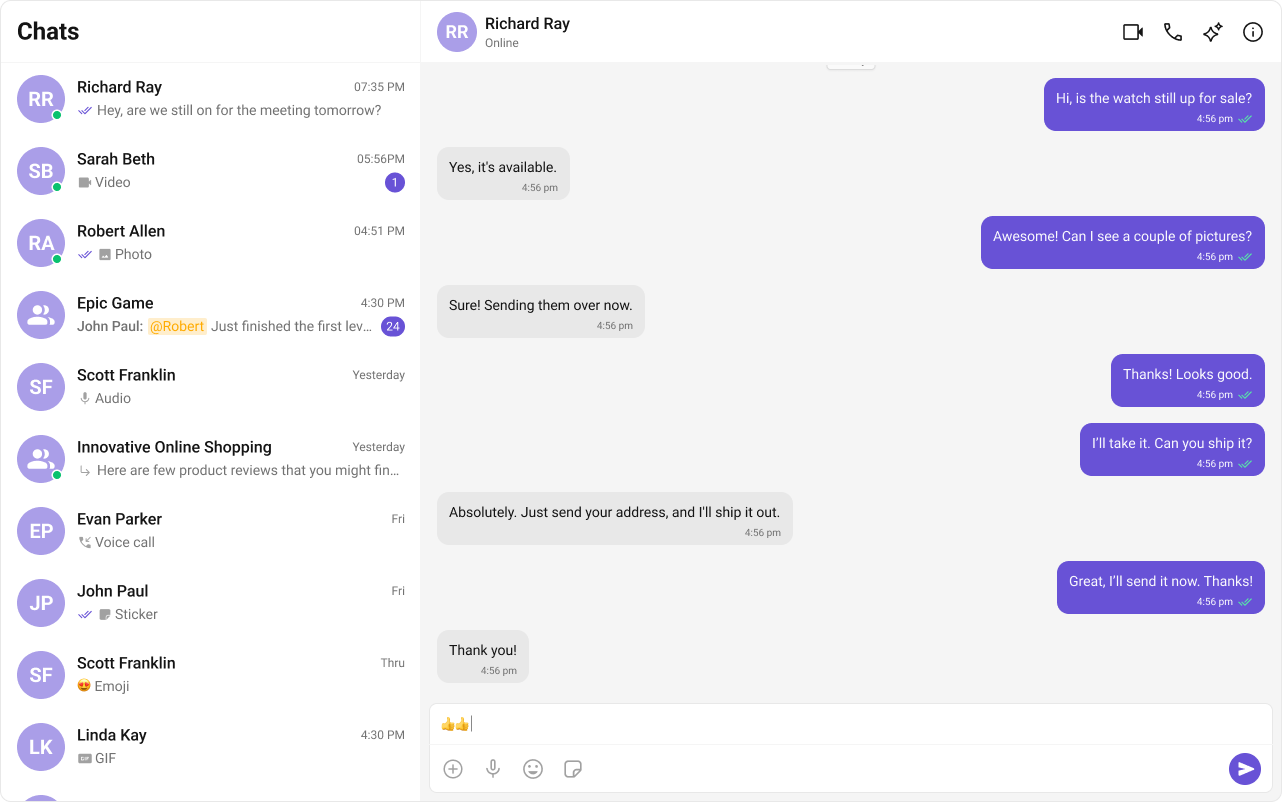
The Conversation List + Message View layout offers a seamless two-panel chat interface, commonly used in modern messaging applications like WhatsApp Web, Slack, and Microsoft Teams.This design enables users to switch between conversations effortlessly while keeping the chat window open, ensuring a smooth, real-time messaging experience.
These icons are available in the CometChat UI Kit assets folder. You can find them at:
🔗 GitHub Assets Folder
TypeScript
CSS
CometChatSelector.tsx
Report incorrect code
Copy
Ask AI
import { useEffect, useState } from "react";import { Conversation, Group, User } from "@cometchat/chat-sdk-javascript";import { CometChatConversations, CometChatUIKitLoginListener } from "@cometchat/chat-uikit-react";import { CometChat } from '@cometchat/chat-sdk-javascript';import "./CometChatSelector.css";// Define props interface for componentinterface SelectorProps { onSelectorItemClicked?: (input: User | Group | Conversation, type: string) => void;}// CometChatSelector component definitionexport const CometChatSelector = (props: SelectorProps) => { const { onSelectorItemClicked = () => { }, // Default function if no prop is provided } = props; // State to store the currently logged-in user const [loggedInUser, setLoggedInUser] = useState<CometChat.User | null>(); // State to track the currently selected item (conversation, user, group, or call) const [activeItem, setActiveItem] = useState< CometChat.Conversation | CometChat.User | CometChat.Group | CometChat.Call | undefined >(); useEffect(() => { // Retrieve the logged-in user from CometChat's login listener let loggedInUser = CometChatUIKitLoginListener.getLoggedInUser(); setLoggedInUser(loggedInUser); }, [CometChatUIKitLoginListener?.getLoggedInUser()]); // Dependency array to trigger effect when user changes return ( <> {/* Render CometChatConversations only if a user is logged in */} {loggedInUser && ( <> <CometChatConversations activeConversation={activeItem instanceof CometChat.Conversation ? activeItem : undefined} onItemClick={(e) => { setActiveItem(e); // Update the selected item state onSelectorItemClicked(e, "updateSelectedItem"); // Trigger callback with selected item }} /> </> )} </> );};
CometChatSelector.css
Report incorrect code
Copy
Ask AI
/* Style for the icon in the header menu of the conversation list */.selector-wrapper .cometchat-conversations .cometchat-list__header-menu .cometchat-button__icon { background: var(--cometchat-icon-color-primary);}/* Change background color of icon on hover */.cometchat-conversations .cometchat-list__header-menu .cometchat-button__icon:hover { background: var(--cometchat-icon-color-highlight);}/* Remove the right border from the search bar */.cometchat-list__header-search-bar { border-right: none;}/* Align submenu items to the left */.cometchat .cometchat-menu-list__sub-menu-list-item { text-align: left;}/* Set specific width and positioning for submenu list */.cometchat .cometchat-conversations .cometchat-menu-list__sub-menu-list { width: 212px; top: 40px !important; left: 172px !important;}/* Style the logged-in user section with a bottom border */#logged-in-user { border-bottom: 2px solid var(--cometchat-border-color-default, #E8E8E8);}/* Prevent cursor interaction on logged-in user menu items */#logged-in-user .cometchat-menu-list__sub-menu-item-title,#logged-in-user .cometchat-menu-list__sub-menu-list-item { cursor: default;}/* Style for logout icon with error color */.cometchat-menu-list__sub-menu-list-item-icon-log-out { background-color: var(--cometchat-error-color, #F44649);}/* Style for logout text with error color */.cometchat-menu-list__sub-menu-item-title-log-out { color: var(--cometchat-error-color, #F44649);}/* Allow pointer interaction on submenu items inside chat menu */.chat-menu .cometchat .cometchat-menu-list__sub-menu-item-title { cursor: pointer;}/* Remove shadow from submenu inside chat menu */.chat-menu .cometchat .cometchat-menu-list__sub-menu { box-shadow: none;}/* Style for submenu icons inside chat menu */.chat-menu .cometchat .cometchat-menu-list__sub-menu-icon { background-color: var(--cometchat-icon-color-primary, #141414); width: 24px; height: 24px;}
Now we will create the CometChatNoSSR.tsx & CometChatNoSSR.css files. Here, we will initialize the CometChat UI Kit, log in a user, and build the messaging experience using CometChatMessageHeader, CometChatMessageList, and CometChatMessageComposer components.
Now, create a route for CometChat in your routes file:
Report incorrect code
Copy
Ask AI
import { type RouteConfig, index, route } from "@react-router/dev/routes";export default [ index("routes/home.tsx"), route("chat", "routes/CometChat.tsx"), // Chat Route] satisfies RouteConfig;
Why disable SSR? CometChat UI Kit Builder relies on browser APIs such as window, document, and WebSockets. Since React Router renders on the server by default, disabling SSR for this component prevents runtime errors.